Zoom rolls out AI Companion to the web, expands free access
Zoom's latest AI update targets knowledge workers with document creation, task automation, and insights across tools

Zoom just launched its AI Companion 3.0 with a key strategic move: making the assistant available on the web and accessible to free users, with some limitations.
This update isn’t just about catching up in the AI race. It reflects Zoom’s broader push to become a daily productivity hub, not just a place for video calls. For marketers and teams juggling meetings, documents, and follow-ups, Zoom is now positioning itself as a central node in the workflow, not a side tool.
This article explores the latest updates to Zoom AI Companion and what they mean for marketing and content teams navigating the ever-expanding AI productivity stack.
Short on time?
Here’s a table of contents for quick access:
- What’s new in Zoom AI Companion 3.0
- Why Zoom’s federated AI approach matters
- Key AI features marketers should explore
- What marketers should know
 Patrecia Meliana
What's new in Zoom AI Companion 3.0
Zoom AI Companion is now accessible through a new browser-based interface (ai.zoom.us), enabling users to work across their Zoom meetings, Google Drive, OneDrive, and Slack. Support for Gmail and Outlook is coming soon.
Crucially, the company is offering a free tier for users on its Basic plan. These users can access the AI assistant in three meetings per month, which includes summaries, note-taking, and real-time question-answering. They also get 20 AI queries per month via the sidebar or web companion.
For broader access, Zoom introduced a US$10 standalone subscription, decoupling AI features from a full Zoom Workplace license. This move clearly targets freelancers, contractors, and small teams.
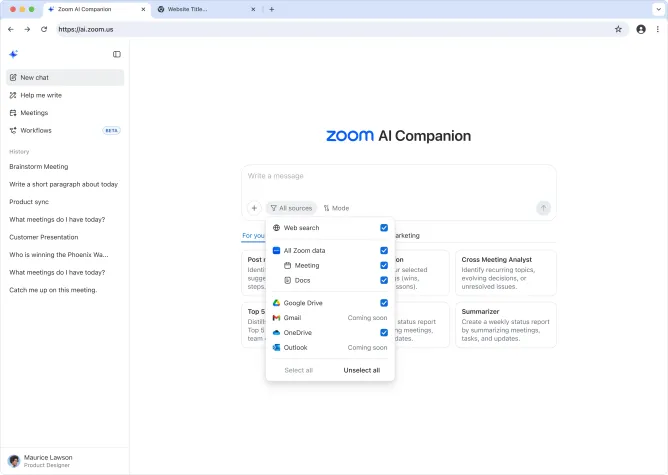
New capabilities in version 3.0 include:
- Daily Reflection Reports that summarize meetings, tasks, and content
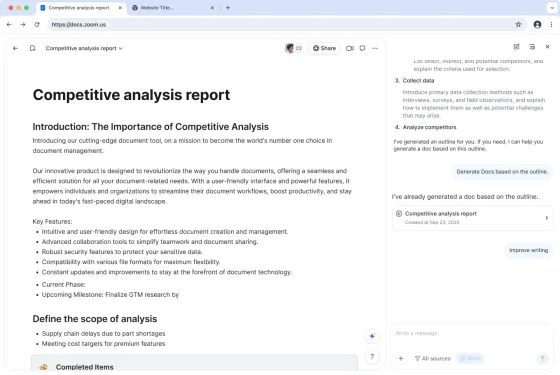
- Document creation and editing tools, with the ability to start drafting in Companion and finish collaboratively in Zoom Docs
- Cross-meeting analysis via specialized prompts that detect recurring topics or unresolved issues
- Agentic retrieval that auto-pulls relevant data from connected apps
- Automated workflows (beta) to streamline recurring tasks like daily thread summaries or report generation
Why Zoom's federated AI approach matters
Rather than rely on a single AI model, Zoom’s federated architecture integrates its own in-house models with APIs from OpenAI, Anthropic, and Google Gemini. This flexibility means it can switch between models based on the task, providing better contextual results without locking into one ecosystem.
For marketing teams, this translates to more accurate content generation and deeper contextual understanding of meetings and documents. It’s especially helpful when dealing with nuanced client discussions or creative briefs.
Lijuan Qin, Head of AI Product at Zoom, emphasized that the platform’s access to meeting context gives it a competitive edge over other productivity tools that operate only at the document level.
Key AI features marketers should explore
Zoom AI Companion is trying to move from passive note-taking to active work acceleration. Here’s where the upgrade could benefit marketing teams:
1. AI-first document drafting
Use meeting discussions to auto-draft campaign briefs, PR plans, or blog outlines directly from the web companion. Teams can then refine the copy collaboratively in Zoom Docs.
2. Follow-up task generation
No more "who’s doing what" moments. AI Companion can auto-generate tasks and email drafts post-meeting, which is helpful for busy agencies juggling multiple clients.
3. Daily insights via reflection reports
Think of it as a productivity digest. It summarizes what was said, what needs doing, and what changed across your workflows.
4. Unified AI workspace
Marketers don’t need to jump between Notion, Slack, and Zoom to piece together campaign updates. Companion pulls it all together into a central AI view.
5. Agentic retrieval for prep and research
Need to pull last week’s pricing discussion or client feedback? AI Companion searches across meetings, files, and notes without manual prompting or file hunting.
What marketers should know
Zoom’s AI Companion 3.0 isn’t just a shiny new feature drop. It signals a shift in how productivity platforms are positioning themselves—with real implications for marketing teams trying to stay agile, efficient, and ahead of the curve. Here are four key takeaways to keep in mind:
1. It’s not just another meeting tool
Zoom’s shift to AI-powered workflows marks a pivot from video conferencing app to productivity layer. Marketers using Zoom only for calls may be underutilizing its evolving capabilities.
2. The freemium model is a strategic bet
Offering free AI access, even with limits, puts Zoom in front of budget-conscious marketing teams who might otherwise default to Notion AI or Google Workspace.
3. This could reshape content ops
Drafting campaign docs or marketing content from actual meeting context is a step beyond basic AI writing tools. It’s less about generating ideas and more about speeding up execution.
4. AI visibility is still critical
While Zoom's assistant may streamline work, marketing leads should remain clear on what’s human-made versus AI-assisted, especially in client-facing assets or decision-making workflows.
Zoom AI Companion 3.0 signals a deeper evolution of workplace AI, moving from answering questions to helping complete work. By connecting real-time meeting data with document tools and automation, it offers marketers a chance to tighten feedback loops, speed up execution, and cut down on busywork.
Whether you’re on the free plan or eyeing the US$10 tier, it’s worth evaluating how Zoom’s AI stack fits into your broader content and collaboration strategy.