Google adds AI Inbox and Overviews to Gmail
Google brings personalized AI to Gmail. Here’s how it could change productivity and customer engagement

Gmail just got a serious AI upgrade. Google is introducing a suite of features aimed at making inboxes more intelligent and efficient, from a personalized AI Inbox to natural-language search with AI Overviews, and a new Proofread tool that rivals Grammarly.
These changes mark a major evolution for the 3-billion-user platform. For marketers and communicators who rely on email for engagement, outreach, and coordination, Gmail’s new AI layer is set to change how we manage and respond to messages.
This article explores what’s new, how these tools work, and what it all means for marketing teams navigating the AI-powered productivity shift.
Short on time?
Here’s a table of contents for quick access:
- What’s new in Gmail’s AI Inbox
- How AI Overviews change email search
- Proofread takes aim at Grammarly
- What marketers should know
 Patrecia Meliana
What's new in Gmail's AI Inbox
The headline feature is the new AI Inbox, a personalized view that helps you cut through inbox clutter. It highlights two main areas:
- Suggested to-dos: auto-summarized tasks pulled from high-priority emails such as bill reminders or follow-ups
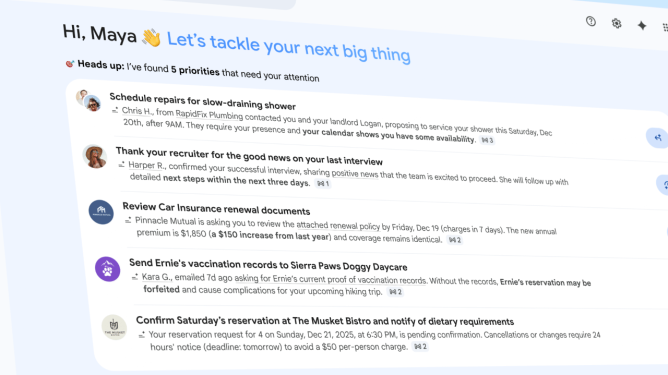
- Topics to catch up on: grouped updates under categories like “Purchases” or “Finances” with shipping statuses or statement alerts
According to Blake Barnes, VP of Product at Google, “this is us delivering on Gmail proactively having your back, showing you what you need to do and when you need to do it.” The AI Inbox doesn’t replace your traditional inbox. It is a toggleable view to help surface what matters most.
Currently limited to trusted testers, AI Inbox will be available to more users in the coming months.
How AI Overviews change email search
Another major update is AI Overviews for Gmail search. Users can now ask questions in natural language instead of relying on keyword searches. For example, “Who was the plumber that gave me a quote for the bathroom renovation last year?” will trigger a response that summarizes key details pulled directly from past emails.
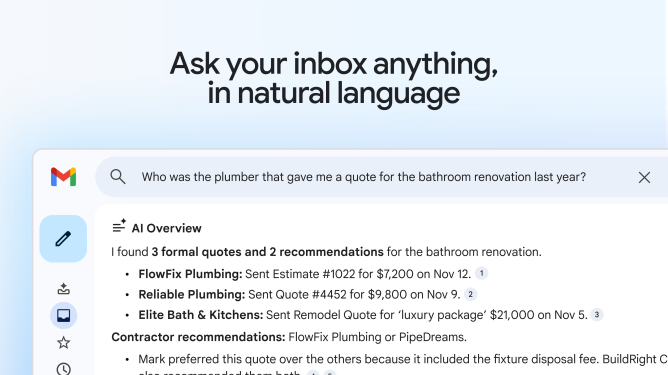
The feature mirrors Google Search’s AI Overviews, but within Gmail it uses only your personal inbox data. No need to dig through threads. Just ask, and get a concise summary at the top of your results.
AI Overviews for search are rolling out to Google AI Pro and Ultra subscribers. However, conversation summaries for long email threads are available to all users starting today.
Proofread takes aim at Grammarly
Also rolling out is Proofread, Gmail’s built-in writing assistant. It analyzes drafts and suggests improvements to clarity, tone, grammar, and structure. Awkward phrases like “might inflict disturbance” are revised to “might disturb,” and word confusion like “weather” versus “whether” gets flagged.
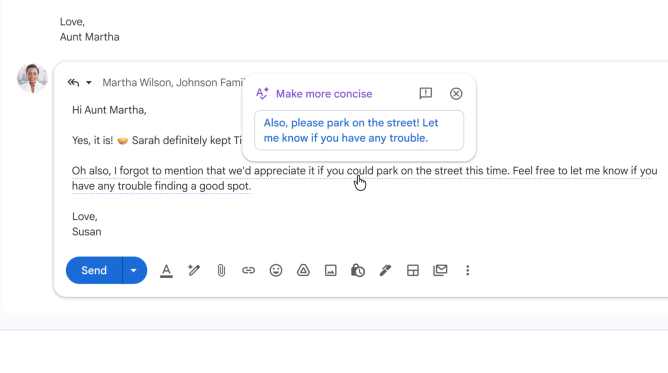
This puts Proofread in direct competition with tools like Grammarly or ChatGPT. For marketers, this could streamline review cycles and reduce reliance on external editing tools.
The Proofread feature is available to Google AI Pro and Ultra subscribers. Meanwhile, Help Me Write and Suggested Replies are rolling out to all users. Help Me Write can generate full email drafts from a short prompt, and Suggested Replies offer contextual one-click responses aligned with your writing style.
What marketers should know
These updates are not just aimed at productivity enthusiasts. They present new dynamics for marketers and communicators to consider:
1. AI summaries are shaping how emails get read
With AI Overviews and summaries, recipients may scan your message via generated highlights. Use clear formatting, scannable bullet points, and strong openers to ensure key points come through.
2. Native proofreading changes writing expectations
With Proofread built into Gmail, expectations for polished writing will rise. Marketers should incorporate this into team workflows and internal reviews, especially when sending high-stakes emails or PR pitches.
3. Email search becomes more strategic
Natural-language inbox queries mean older emails are more accessible than ever. This unlocks value from past conversations and campaign threads, giving marketers quicker access to institutional memory.
4. Third-party tools could lose relevance
Grammarly, Superhuman, and similar apps might lose ground as Gmail absorbs these features natively. Marketers should audit which tools still offer unique value or better integrations for team productivity.
Gmail’s new AI direction is not just a feature refresh. It reflects a bigger shift in how work and communication are evolving. From faster replies to smarter writing and real-time search, the inbox is becoming less of a passive archive and more of an active productivity hub.
For marketers, the message is clear. These tools can offer real-time support, but they also raise the bar for clarity and intent. The brands that will benefit most are those who blend automation with authenticity, adapting their workflows without losing the human element.